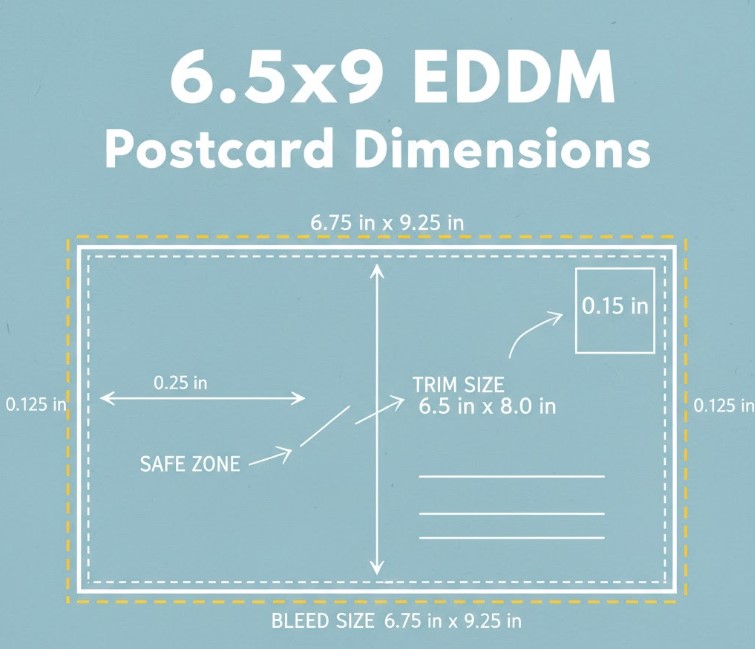
For graphic designers and DIY marketers, “close enough” doesn’t count in printing. If you are designing a 6.5″ x 9″ mailer in Photoshop, you need the exact pixel dimensions, safe zones, and bleed settings to ensure your print run looks flawless.
This guide covers the math so you don’t have to.
The Golden Rule: 300 DPI
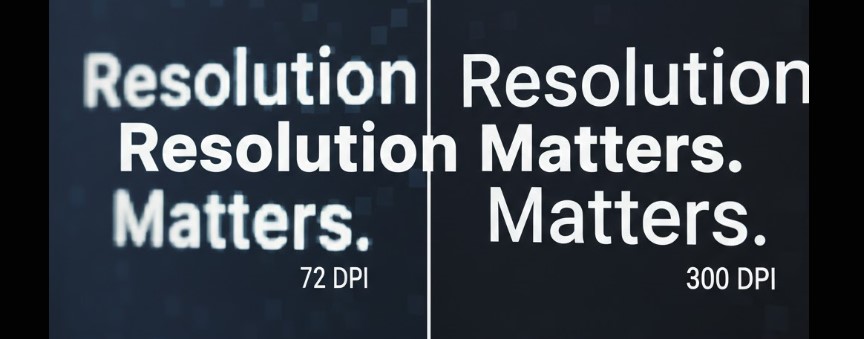
Screens display at 72 DPI (Dots Per Inch). Printers print at 300 DPI or higher.
If you grab a JPEG from your website and try to print it, it will look pixelated and blurry. Always start your file at 300 DPI.
EDDM Pixel Conversion Cheat Sheet (Includes Bleed)
Standard industry bleed is 0.125″ (1/8 inch) on all four sides.
| Final Trim Size (Inches) | File Size with Bleed (Inches) | Pixel Dimensions (300 DPI) |
| 6.5″ x 9″ | 6.75″ x 9.25″ | 2025 x 2775 px |
| 6″ x 11″ | 6.25″ x 11.25″ | 1875 x 3375 px |
| 8.5″ x 11″ | 8.75″ x 11.25″ | 2625 x 3375 px |
| 11″ x 17″ | 11.25″ x 17.25″ | 3375 x 5175 px |
Understanding “Bleed” vs. “Safe Zone”
When we trim a stack of 5,000 postcards, the blade can shift a fraction of a millimeter.
- Bleed (The Extra): Your background image must extend 0.125″ beyond the trim edge. If you stop your background exactly at the edge, a tiny shift in the blade will leave an ugly white hairline on your card.
- Safe Zone (The Protection): Keep all text and logos 0.125″ to 0.25″ inside the trim edge. This ensures your phone number or headline doesn’t get chopped off.
CMYK vs. RGB: The Color Shift
Your monitor emits light (Red Green Blue – RGB). Our presses use ink (Cyan Magenta Yellow Black – CMYK).
- The Trap: Bright neon blues and electric greens in RGB are physically impossible to print with standard ink. They will turn muddy or purple when printed.
- The Fix: Convert your file to CMYK mode (US Web Coated SWOP v2) before you finish designing. What you see in CMYK mode is what you get in the mailbox.
Designer Checklist: Before You Send to Press
- [ ] Resolution: Is the file 300 DPI at actual size?
- [ ] Bleed: Does the artwork extend 0.125″ past the trim line?
- [ ] Safe Zone: Is all text at least 0.25″ inside the trim?
- [ ] Color: Is the document mode CMYK?
- [ ] Blacks: Is body text 100% K (Black), not a “Rich Black” mix? (Rich black on small text causes fuzziness).
Don’t want to do the math? Download our pre-measured .PSD and .AI templates below, or upload your file for a free technical pre-flight check by our team.