


When you’re designing an eddm template usps compliant piece, understanding the precise regulations isn’t just helpful—it’s absolutely essential for ensuring your mail gets delivered. Every Door Direct Mail (EDDM) offers remarkable value for local businesses, but the technical requirements can trip up even experienced designers.
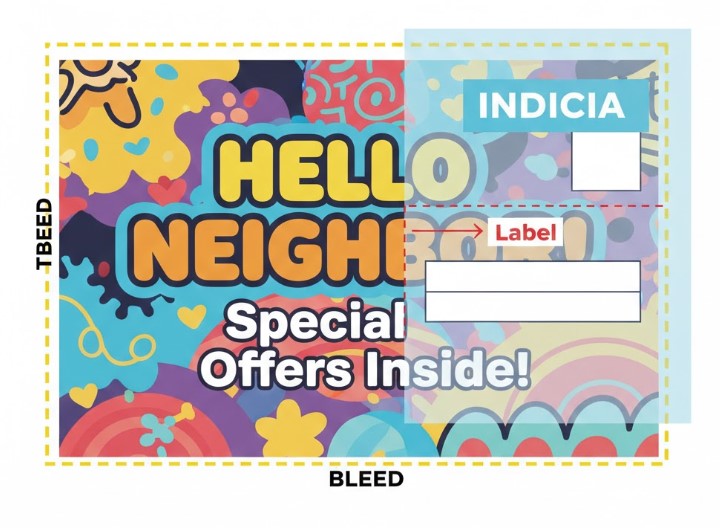
Unlike standard mailers, EDDM pieces have specific formatting rules that must be followed exactly, particularly regarding the indicia—the official postal marking that authorizes your piece for bulk mailing rates. What many entrepreneurs don’t realize is that a single millimeter of error in your template can trigger rejection from USPS processing facilities, wasting precious time and marketing budgets.

Eddm – Eligible – Postcard – 6.5inx9 Inches – H – Back – Eddm – Side

Eddm – Eligible – Postcard – 8inx6.5 Inches – H – Front

Eddm – Eligible – Postcard – 6.5inx12 Inches – H – Back – Eddm – Side

Eddm – Eligible – Postcard – 6.5inx12 Inches – H – Front

Eddm – Eligible – Postcard – 6.5inx9 Inches – H – Front

Eddm – Eligible – Postcard – 8.5inx11 Inches – H – Back – Eddm – Side

Eddm – Eligible – Postcard – 8.5inx11 Inches – H – Front

Eddm – Eligible – Postcard – 8inx10 Inches – H – Back – Eddm – Side

Eddm – Eligible – Postcard – 8inx10 Inches – H – Front

Eddm – Eligible – Postcard – 8inx6.5 Inches – H – Backeddm – Side

Eddm – Eligible – Postcard – 9inx11 Inches – H – Back – Eddm – Side

Eddm – Eligible – Postcard – 9inx11 Inches – H – Front

Eddm – Eligible – Postcard – 9inx12 Inches – H – Back – Eddm – Side

Eddm – Eligible – Postcard – 9inx12 Inches – H – Front

Eddm – Eligible – Postcard 6.5inx11 Inches – H – Back – Eddm – Side

Eddm – Eligible – Postcard 6.5inx11 Inches – H – Front


The beauty of EDDM lies in its ability to reach every household in selected neighborhoods without requiring individual addresses or mailing lists. However, this convenience comes with strict design parameters that protect both postal workers and recipients. The USPS has developed these standards over decades of handling billions of mailpieces, optimizing for machine readability and efficient sorting. While these rules might seem restrictive at first glance, they actually create a framework that, when mastered, allows your marketing message to shine without technical distractions. Learning to work within these boundaries transforms compliance from a frustrating obstacle into a strategic advantage.
Why the Indicia Placement is Non-Negotiable
The indicia—often called the “postage box” or “mailer ID box”—is perhaps the most critical element of your EDDM template. This small rectangle in the top right corner of your mailpiece isn’t merely decorative; it’s your legal authorization to use discounted bulk mailing rates. The USPS treats indicia placement with zero tolerance because automated sorting machines scan this area precisely. When designers place the indicia incorrectly—either too high, too low, or too close to the edge—the entire batch can be rejected or delayed at processing facilities.
What makes this particularly challenging is that the indicia’s positioning requirements differ slightly based on your mailpiece’s dimensions and orientation. For standard postcards (typically 4.25″×6″), the bottom edge of your indicia must sit precisely 0.75 inches from the top edge of your card. For larger formats, this measurement changes, creating a complex calculation that many design programs don’t automatically account for. Furthermore, the indicia must remain completely free of any overlapping elements, shadows, or decorative borders—requirements that often conflict with modern design aesthetics.
This strict positioning serves a practical purpose beyond bureaucratic compliance. Postal processing equipment relies on consistent placement to quickly identify and categorize mailpieces. When every EDDM piece follows identical formatting, the machines can process thousands of items per hour with minimal human intervention. For small businesses relying on timely delivery for promotions or events, understanding these mechanics transforms the indicia from a design constraint into a delivery guarantee. Remember that the USPS processes over 400 million pieces of mail daily—their rules exist to keep that system functioning smoothly.
Common Design Mistakes That Cause Rejection
Even the most beautiful, compelling EDDM campaign can be derailed by seemingly minor technical errors. After reviewing thousands of files submitted by clients, certain patterns of rejection emerge repeatedly. The most frequent culprits aren’t creative failures but technical oversights that could be prevented with proper template guidance. What’s particularly frustrating for business owners is that these errors often aren’t visible until the job is already in production, causing costly delays and rushed redesigns.
Putting Text Too Close to the Edge
One of the most common—and most easily preventable—errors involves placing critical text too close to the edge of your design. The USPS requires a “safe zone” or “live area” of at least 0.25 inches from all edges where no essential content should appear. This buffer exists because industrial cutting equipment can shift slightly during trimming, potentially slicing through text or key visual elements. More importantly, postal sorting machines grip mailpieces from the edges, and content extending too close can become damaged or unreadable during handling.
Designers accustomed to web or social media graphics often underestimate how much space this safety margin requires. A headline that looks perfectly positioned on screen might actually be just 0.1 inches from the edge—well within the danger zone. The solution involves creating templates with clearly marked safe zones and bleed areas, allowing designers to position content confidently. Professional printing services often provide these templates, but many small businesses attempt to save costs by creating their own files without understanding these technical requirements.
Using Low-Res Images (72dpi vs 300dpi)
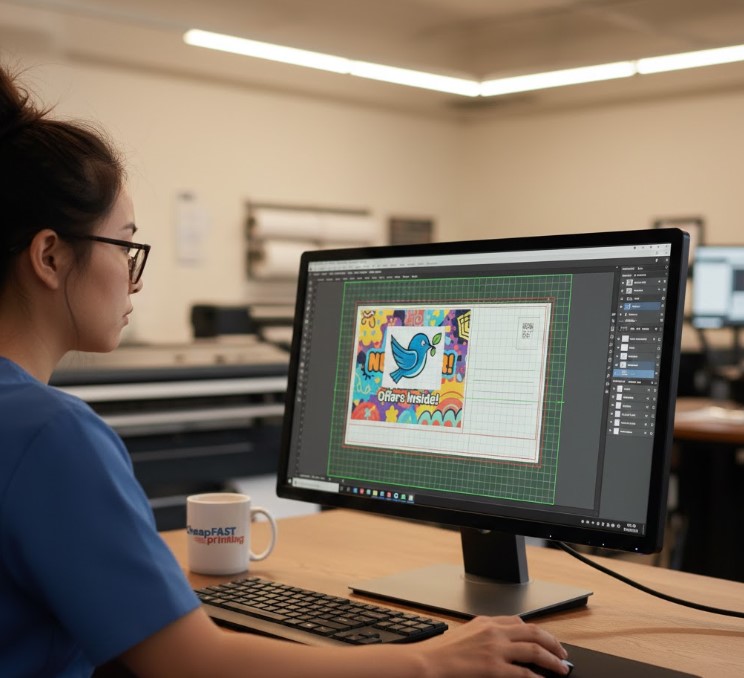
Another frequent rejection trigger involves image resolution—a technical detail that can dramatically impact the perceived quality of your marketing materials. Digital designers often work with web-optimized 72dpi (dots per inch) images because they load quickly online. However, printed materials require significantly higher resolution—typically 300dpi for professional results. When 72dpi images are enlarged to fit an EDDM template, they appear pixelated, blurry, or washed out, failing to make the professional impression your business deserves.
This resolution problem compounds when combined with the indicia placement requirements. Text that appears sharp on screen at 72dpi becomes fuzzy and difficult for postal scanners to read when printed. The USPS doesn’t merely reject blurry mailpieces for aesthetic reasons; they reject them because automated equipment cannot reliably process them. Investing in properly resolutioned images isn’t just about visual appeal—it’s about ensuring your mail reaches its intended audience. For local businesses operating on tight budgets, this technical detail often becomes the difference between a successful campaign and wasted marketing dollars.
Our “Free Manual Review” Safety Net
Understanding these technical complexities, we’ve developed a comprehensive pre-printing review process that catches errors before they become expensive problems. Our team of experienced print technicians manually examines every EDDM template submission against USPS requirements, paying special attention to the critical elements that trigger the most rejections. This service—provided at no additional cost—represents our commitment to ensuring your marketing materials not only look professional but also meet postal regulations for seamless delivery.
Unlike automated preflight checks that only verify technical specifications, our human review process considers the practical realities of postal handling and delivery. Our technicians have worked with thousands of EDDM campaigns across diverse industries, developing an intuitive understanding of which design elements tend to cause problems in real-world processing. This institutional knowledge allows us to provide specific, actionable feedback rather than generic error messages.
We Catch Errors Before Ink Hits Paper
Our review process begins the moment your file uploads to our system. Within 2-4 business hours (often much faster), you’ll receive detailed feedback on any compliance issues. Common corrections we identify include:
- Indicia positioning adjustments for optimal machine scanning
- Safe zone violations where critical text or logos extend too close to edges
- Color mode conversions from RGB (for screens) to CMYK (for professional printing)
- Image resolution improvements to prevent pixelation and blurriness
- Fold line placements that might interfere with postal processing equipment
- Font embedding issues that could cause text substitution during printing
This preventative approach saves our clients significant time and money. Rather than discovering problems after printing has begun—or worse, after the post office rejects an entire batch—issues are resolved during the design phase when changes are simple and cost-effective. For small business owners without dedicated design teams, this safety net provides peace of mind that their marketing investment will actually reach customers as intended.
Visual Impact: Designing for the Template
Working within USPS constraints doesn’t mean sacrificing visual impact—in fact, understanding these boundaries can enhance your design’s effectiveness. Successful EDDM campaigns leverage the template structure to create memorable, engaging pieces that stand out in crowded mailboxes while still meeting technical requirements. The key lies in treating postal regulations as creative parameters rather than limitations, much like how a skilled poet works within sonnet structure to create something beautiful.
One powerful approach involves creating a visual hierarchy that guides the recipient’s eye through your message while keeping critical elements safely within required zones. By deliberately positioning your strongest visual elements and most compelling copy within the “safe zone,” you ensure both compliance and impact. This strategic placement often results in more focused, effective designs than unconstrained layouts that scatter attention across the entire piece.
Using the Full Bleed for Massive Attention
Full bleed printing—where your design extends to the very edge of the paper—creates a professional, high-impact impression that standard margin-based designs simply can’t match. When executed correctly within EDDM template guidelines, full bleed designs convey premium quality and capture attention immediately. The psychological effect is significant: mailpieces with full bleed designs are perceived as more valuable and authoritative than those with visible white borders, increasing the likelihood they’ll be read rather than discarded.
Achieving proper full bleed requires extending your background elements 0.125 inches beyond each edge of your document size—a technical detail known as the “bleed area.” Many design programs can automate this process, but understanding why it matters helps ensure proper execution. During printing, paper can shift slightly on press, and during cutting, blades may not align perfectly with your digital file. The bleed area provides a buffer that prevents unsightly white edges from appearing when these minor shifts occur. For EDDM pieces specifically, this professional finish helps overcome recipient skepticism about direct mail marketing.
Contrast and Color: Making It Pop
Within the constraints of EDDM templates, strategic use of color and contrast becomes even more crucial for capturing attention. Postal regulations require certain areas to remain relatively clear (particularly around the indicia and address block), which creates natural “negative space” that can be leveraged for visual impact. Designers who understand this can create pieces where compliant elements actually enhance rather than compete with marketing messages.
High contrast combinations—such as deep navy text on cream backgrounds or vibrant accent colors against neutral tones—increase readability and visual interest without violating postal guidelines. More importantly, these choices improve accessibility for all recipients, including those with visual impairments. When testing designs, view them at arm’s length (the typical distance for initial mailbox scanning) to ensure your key message remains clear and compelling within the EDDM template framework.
Get Your Compliant Prints Fast
Navigating EDDM template requirements doesn’t need to slow down your marketing momentum. With the right preparation and partnership, you can maintain compliance while achieving rapid turnaround times that support time-sensitive campaigns. The most successful local businesses treat EDDM as an integrated marketing channel rather than a one-off tactic, developing template systems that can be quickly customized for different offers while maintaining postal compliance.
For urgent campaigns, preparation becomes even more critical. Having your design files properly formatted according to USPS specifications before you need them eliminates the most common delays in the printing process. Many of our clients maintain a “compliant template library” for different campaign types—a strategy that accelerates production while ensuring technical accuracy. This approach transforms EDDM from a production headache into a strategic marketing asset that can be deployed with confidence.
The relationship between speed and compliance is often misunderstood. Rushing through template preparation actually slows down delivery when postal rejections occur. Conversely, investing time upfront to perfect your EDDM template creates a foundation for consistently fast throughput. Our fastest-turnaround clients aren’t those who submit files at the last minute; they’re the ones who have mastered the technical requirements and work within a proven system. For local businesses competing in crowded markets, this efficiency translates directly to competitive advantage and better marketing ROI.
Whether you’re promoting a weekend sale, launching a new service, or building neighborhood awareness, your EDDM mailers deserve to reach every intended household without technical delays. By respecting the precise requirements of the eddm template usps system while optimizing for visual impact, you create marketing materials that work as hard as you do. The technical precision required might seem daunting at first, but with the right guidance and attention to detail, compliance becomes second nature—freeing you to focus on the creative messaging that makes your business unique.
For comprehensive official guidance on Every Door Direct Mail requirements, the United States Postal Service provides detailed specifications and resources at their PostalPro EDDM information page, where you can access the most current regulations and design templates directly from the source.
Remember that a perfectly compliant eddm template usps design isn’t just about avoiding rejection—it’s about respecting the complex system that delivers your message to thousands of potential customers. When your file meets all technical requirements, it flows smoothly through postal processing facilities, reaching mailboxes faster and in better condition. This technical precision, combined with compelling creative content, creates marketing materials that truly work while you sleep.
Many businesses discover that once they master these requirements, their design process actually becomes more efficient. Rather than constantly adjusting for postal rejections, they can focus their creative energy on crafting messages that resonate with local audiences. The eddm template usps framework, when understood properly, provides a reliable structure for marketing success rather than an obstacle to overcome. For neighborhood businesses building local awareness, this combination of technical compliance and creative freedom offers one of the highest returns of any marketing channel available today.
As postal technology continues to evolve, staying current with EDDM template requirements ensures your marketing remains effective and efficient. What worked five years ago may no longer align with today’s automated processing systems, making regular verification of your templates essential. By partnering with printing professionals who maintain current knowledge of postal regulations, you protect your marketing investment while maximizing delivery success. The difference between a rejected batch and a perfectly delivered campaign often comes down to millimeters of positioning and precise attention to the technical details that many overlook.
Resources: https://postalpro.usps.com/